Turn a Jira issue into an implementation plan.
VibePlan reads an issue’s requirement and drafts a phased implementation plan — published to Confluence, linked back to the issue, with human-day and AI-day effort estimates. Pair your computer, run your own AI agent, and get a codebase-aware plan you control end to end.
Your own agent, your own machine · Your model, your cost
 Plan lives on the issueHuman + AI effort
Every issue needs a plan. Writing one is the slow part.
Good planning is the difference between shipping and thrashing — but it rarely gets done well.
The Blank Page
A phased plan with realistic estimates takes real time to write from scratch — so most issues get a one-liner, or nothing at all.
The Disconnect
Plans live in a doc that drifts from the issue. The ticket and the plan fall out of sync, and nobody can find the latest.
The Estimate Gap
How long will this take — and how much can AI accelerate? Without a quick read on effort, planning and prioritising are guesswork.
One click on the issue. A real plan in Confluence.
Drafted by AI, reviewed by you.
Open the issue
On any Jira issue, press Generate Plan. VibePlan reads the issue’s summary, description, and linked Jira and Confluence context — that’s the whole input.
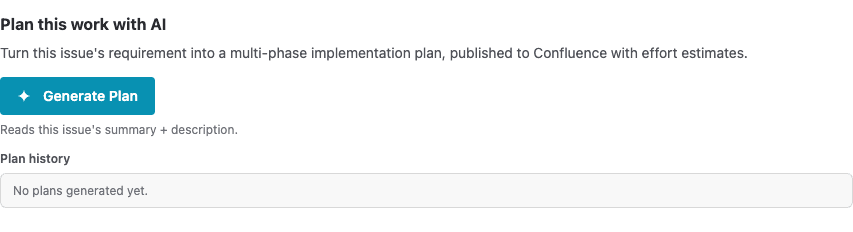

AI drafts it
Your paired machine runs your own AI agent on the requirement and drafts the plan on your hardware. You watch it work in the panel, with a Stop button if you need it.
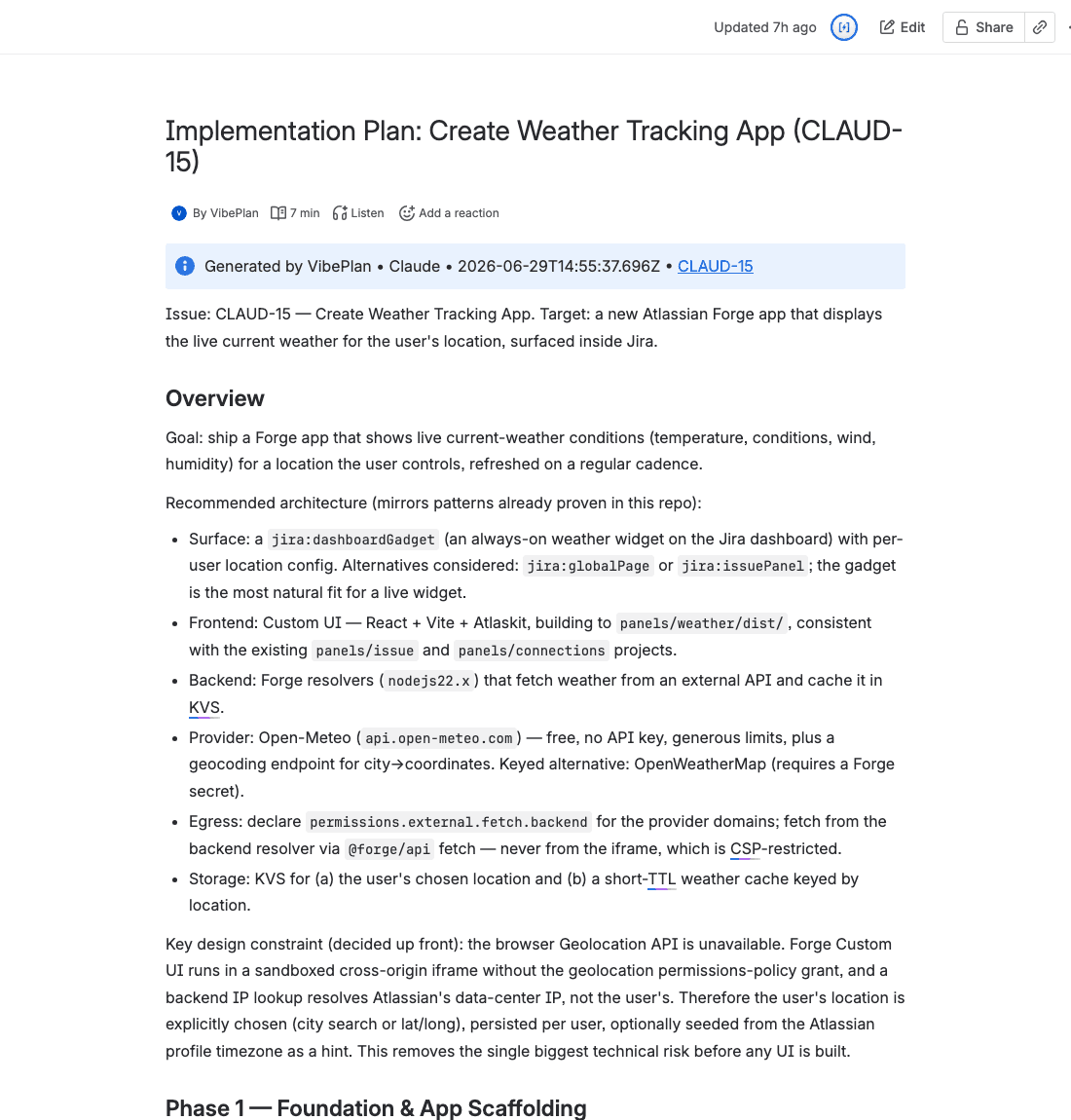
Review in Confluence
The phased plan publishes to the Confluence space you chose, links back to the issue, and drops two effort estimates — human-days and AI-days — onto the issue’s fields. Refine it, comment on it, regenerate from the comments.
Start in three steps
1) Install from the Marketplace & pick a Confluence space → 2) Pair the free desktop app and your AI agent → 3) Press Generate Plan.
A planning draft on every issue — your way.
AI-drafted phased plansAI
From the issue’s requirement, the agent writes a focused, multi-phase plan — purpose, concrete tasks, and an acceptance criterion per phase. Start from a real draft, not a blank page.
Runs on your own machineLocal-first
Drafting happens on your paired machine, through your own AI agent. The issue context stays on your hardware and only the finished plan comes back — no AppDash backend in the path.
Published to Confluence
Each plan becomes a real Confluence page in the space you choose — formatted, with code blocks as code macros, and linked back to the issue it came from.
Human + AI effort estimates
Every plan carries two numbers — developer human-days and the AI-days AI can accelerate — written straight onto the issue’s fields for planning and triage.
Regenerate from comments
Comment on the Confluence page, then Regenerate — VibePlan folds the feedback in and updates the page in place. The plan improves with the conversation.
Plan history on the issue
Every attempt is kept — generate new variants alongside old ones, open any of them in Confluence, and remove the ones you don’t need.
Bring your own agent
Pair a computer and VibePlan runs through the AI coding agent you choose — Claude Code by default — for a deeper, codebase-aware plan. You control the model and the cost.
From requirement to reviewed plan.
Real screenshots from the product — the panel on the issue, the published plan in Confluence, and the settings that point it at your space.
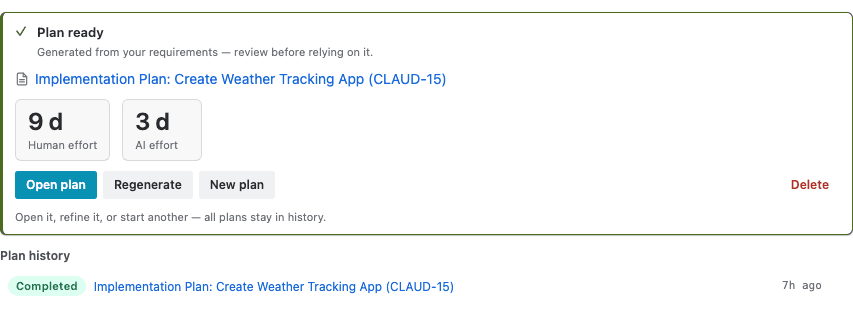
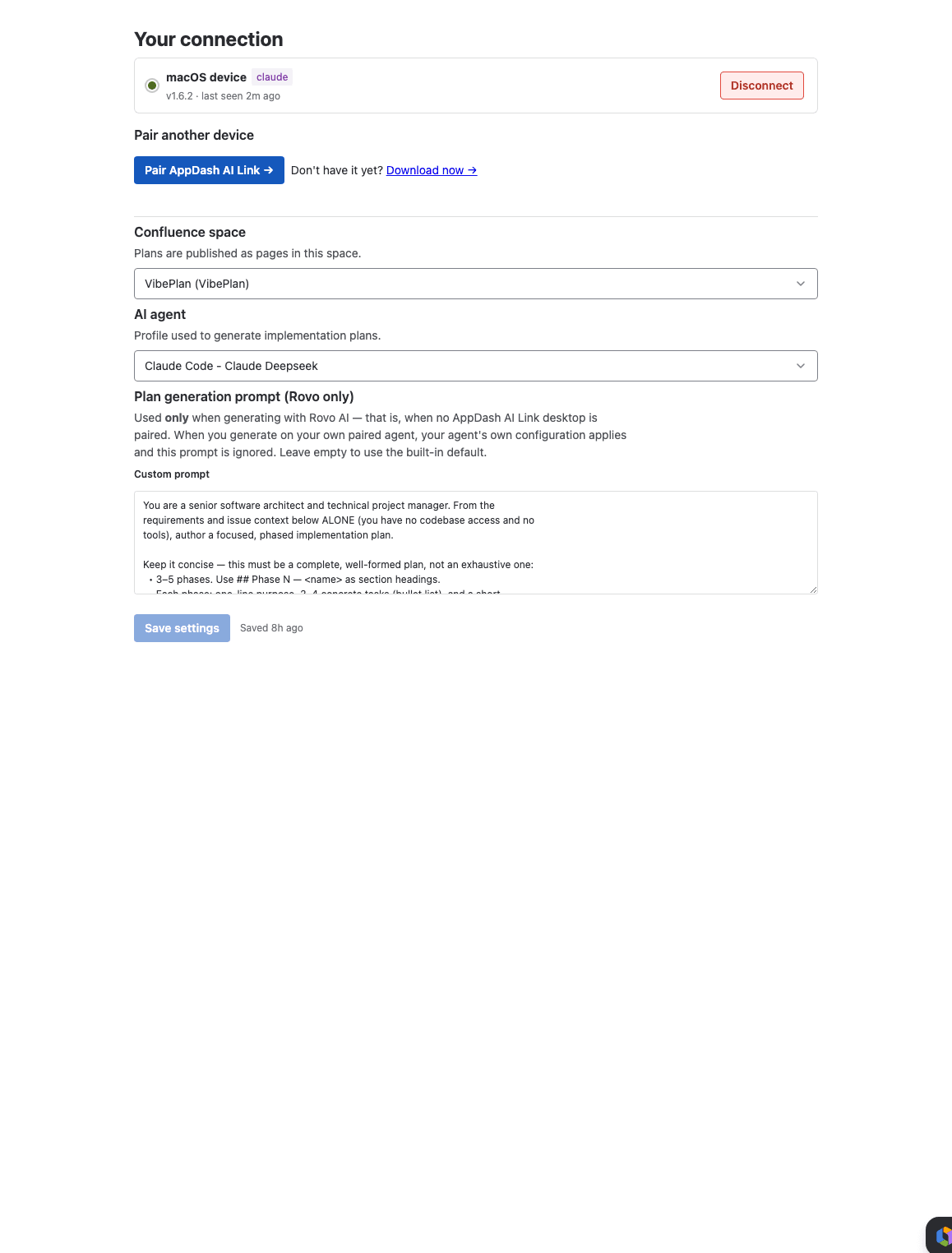
Drafted on your machine. Read in Confluence.
Your paired machine runs your own AI agent for a codebase-aware plan, and the result always lands in Confluence.
Jira Issue
The issue’s requirement and linked context are the input. Plan history and effort estimates live on the issue.
Your paired machine
Your own AI agent drafts the plan on your hardware — reading your codebase when a working directory is set.
Confluence
The phased plan publishes to your space and links back to the issue, ready to review and comment.
Your agent, your hardware, your control.
VibePlan dispatches each plan to the free AppDash AI Link app on your paired machine, where your own AI agent does the drafting — your own model, your own environment, and a plan that can read your codebase. The issue context stays on your machine, there’s no AppDash backend in the path, and you control the model and the cost.
Built for the people who turn issues into work.
Product managers & analysts
Turn a requirement into a phased plan with an effort estimate — without writing it from scratch or waiting on engineering.
Engineers & tech leads
Get an AI starting point — codebase-aware when you run your own agent — then refine it in Confluence instead of staring at an empty doc.
Delivery & project managers
Human-day and AI-day estimates on every issue, so planning and prioritisation start from a number, not a hunch.
Security-conscious teams
Pair a computer and the plan drafts on your own machine with your own agent — issue context need not leave your laptop. See the security model →
Security by design, not by promise.
Pair your computer and plan generation runs on your own machine — no external backend, your perimeter stays yours. Plans publish to your Confluence with your own permissions.
Ed25519-signed pairing
Your desktop and Jira pair with a signed handshake you confirm on both sides — no shared secrets in transit.
Local-first drafting
With a paired machine, the agent runs on your hardware with your environment. The issue context stays on your machine.
Per-job JWT
Each generation is authorized by a short-lived token scoped to that single job — nothing long-lived.
Your Confluence, your permissions
Plans are published as you, into a space you can edit — VibePlan never writes where you couldn’t.
Free to install.
Install today at no cost — free for a limited time. No card, no catch.
Questions, answered.
Do I need the desktop app?
Yes — generating a plan runs on a paired machine. Install the free AppDash AI Link app, pair it with your site, and point it at your AI agent. From then on, Generate Plan on any issue drafts the plan on your machine.
Where do plans get published?
To a Confluence space you choose in project settings. Each plan is a real page, linked back to the issue, with the generated phases and an info header.
What are the two effort numbers?
Human-days (developer calendar time) and AI-days (the fraction an AI agent can accelerate). Both are written onto the issue’s fields for planning and triage.
Which AI does it use?
The one you choose — Claude Code by default, or any CLI agent you configure on your paired machine. You control the model, its cost, and the environment it runs in.
Does it touch my code?
VibePlan reads the issue and writes a plan document — it doesn’t run, change, or deploy anything. Point your agent’s working directory at a local checkout and it can read your project for a more grounded plan; otherwise it drafts from the issue context alone.
Mac or Windows?
Both. The desktop companion runs on macOS (Apple Silicon and Intel) and 64-bit Windows 10 or 11 — a paired computer on either platform can generate a plan.
Plan the work — free.
Install VibePlan from the Atlassian Marketplace, pick a Confluence space, and generate your first plan in minutes.